Create the Ultimate
PowerPoint Master Template
Start building presentations that are smart and re-usable.
From frustration to confidence!
Your presentations take too long to build, the learning gaps are too wide, and the bad habits are hard to shake. And somehow, there’s never enough time to get it right the first time — you’re not alone.
In our experience, 95% of PowerPoint presentations are built haphazardly and are built wrong.
In our upcoming course, you’ll learn how to build a PowerPoint presentation template from scratch — so every deck you make is faster to design, visually consistent, and professionally polished.
Who this is course is for
- Entrepreneurs & Startups
- Enterprises & Advertising Agencies
- Executive Assistants
- Your Design Team
- Your Sales Team
- Family Businesses
- Graphic Designers
And anyone who realizes the potential of using Master Layouts and Templates when authoring PowerPoint presentations.
Sign up early and claim your free gift
We respect your privacy and keep your details secure. By signing up, you’ll also receive our free guide: 10 mistakes you’re making in PowerPoint and how to fix them. You’ll only hear from us with valuable updates and resources.
From frustration to confidence

Before
- Building PowerPoint presentations feel like a last-minute chore: You feel like this task is beneath your skillset, but it’s too important to delegate. You can’t help wishing there was a magic wand to make everything work effortlessly.
- Rearranging content feels like a never-ending puzzle: You keep shuffling pre-set elements on the slide—logos, headings, placeholders—and wonder why it’s so frustrating and time-consuming. Surely there must be an easier way.
- Adding content to your presentations and formatting the slides seem to take ages: Every time you move something, the layout breaks or slides look inconsistent. It’s distracting and takes the focus away from your actual message.


After
- You actually enjoy working in PowerPoint: With your own customized Master Slides and Layouts, PowerPoint feels like it’s designed just for you. It’s intuitive, and every task feels seamless — making even mundane presentation tasks work like magic.
- No more surprises: Everything stays exactly where it should — fonts, colors, and layouts are consistent across every slide. The presentation comes together smoothly, leaving you confident and in control.
- Slide creation takes minutes, not hours: What used to be a long, frustrating process is now a quick and efficient task. You have more time to focus on refining your ideas and delivering impactful presentations.
What you’ll achieve with this course:

Work smarter not harder
Learn to create templates that work across all your presentations. Say goodbye to redoing slides for every project.

Set it and forget it
Set-and-forget your key brand visuals and assets, so everything looks polished — and consistent without any effort.

Save money
Stop paying expensive freelancers or wasting time on trial-and-error design.

Edit with ease
Feel confident editing, resizing, and customizing slides without worrying about breaking your design.
Flexible Pricing Options for Every Need
Corporate Licensing
Empower your entire team with consistent, high-quality templates.-
10 seat team members.
-
Priority support for corporate accounts.
-
Access time-saving features.
Professionals
Streamline your workflow and build templates that work smarter for you.-
For individuals and freelancers
-
Full access to step-by-step course materials.
-
Downloadable templates and resources.
Students and Educators
Perfect for the next generation of presentation and pitch deck creators.-
Student-friendly, step-by-step instructions.
-
Lifetime access, perfect for ongoing learning.
-
Ideal for onboarding and training.
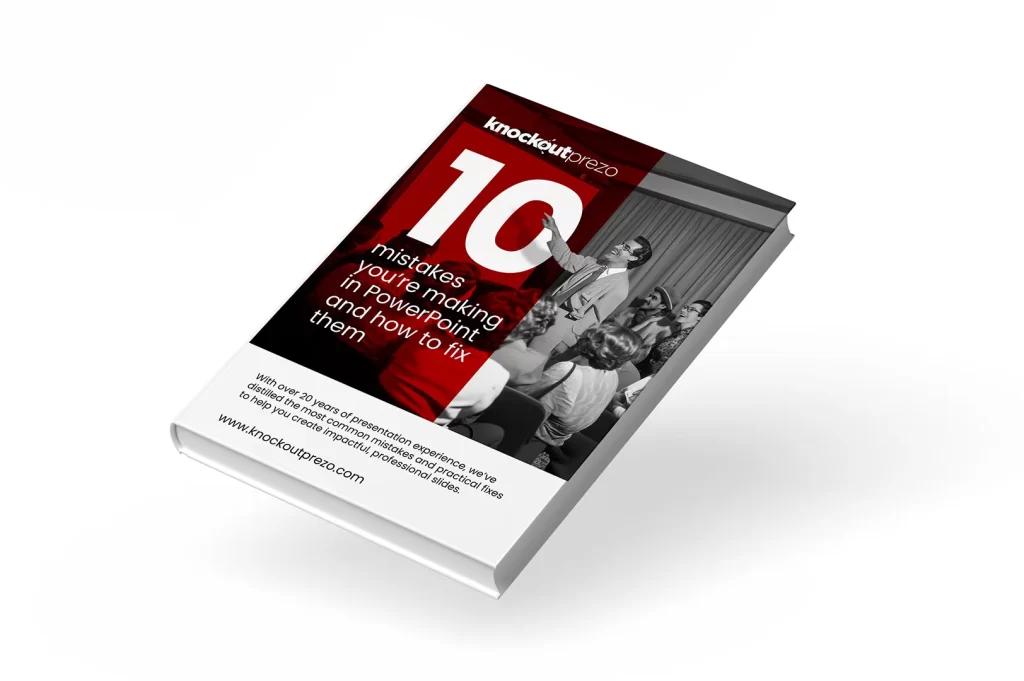
Exclusive FREE download offer
10 mistakes you’re making in PowerPoint and how to fix them
Struggling with inconsistent slides, messy layouts, or time-consuming designs? This exclusive guide, available only to those who pre-register, reveals the top 10 PowerPoint template mistakes professionals make—and how to fix them fast. Learn how to create polished, consistent, and reusable templates that save time, cut costs, and impress every audience.
While you wait for the course, sign up with your email to grab this exclusive free guide and uncover common PowerPoint template mistakes—and how to fix them for professional results.
We respect your privacy and keep your details secure. By signing up, you’ll also receive our free guide: 10 mistakes you’re making in PowerPoint and how to fix them. You’ll only hear from us with valuable updates and resources.
What You’ll Learn in This Course
Why This Course is Different
Master the tools that make PowerPoint work like magic.
Create a system that works for any presentation
Save hours on every presentation you create
Polish your presentations with subtle but impactful tweaks
Design templates that look like they came from an agency
Avoid the mistakes that ruin most templates
- Step-by-step guidance: Even if you’re a beginner, you’ll learn a structured approach to creating templates you’ll use repeatedly.
- Time-saving hacks: Real-world tips that go beyond theory to help you streamline your workflow.
- Professional insights: Leverage techniques used by top designers to create templates that wow any audience.
Some of the companies we have built templates for
Helping with Handover: Make Collaboration Effortles
This course isn’t just for those who frequently design PowerPoint presentations—it’s also tailored for individuals preparing content to hand over to designers or collaborators.
Learn how to:
- Create structured templates that are easy for others to pick up and use.
- Set up clear, consistent branding (fonts, colors, layouts) to streamline the design process.
- Avoid common pitfalls that can make slides harder to edit or reuse later.
- Save time by handing over polished, pre-formatted content that requires minimal adjustments.
Whether you’re part of a team or outsourcing design work, this course equips you to build presentations that ensure smoother collaboration and a professional final result—without frustration.
Here are some of the materials you will receive with the course that will improve the speed, out of the box
- Vanilla presentation that you can use for all the presentations going forward that is streamlined based on everything we discuss in this course.
- PowerPoint presentation template checklist
- 10 Mistakes you’re making in PowerPoint and how to fix them guide.
Compatibility Beyond PowerPoint
This course isn’t limited to PowerPoint alone! The techniques and principles you’ll learn are also compatible with Google Slides and Keynote templates.
- Google Slides: Apply the same branding, layouts, and design strategies for seamless presentations in the cloud.
- Keynote: Adapt your templates for Apple’s presentation software while maintaining a professional look and feel.
Disclaimer: While most techniques translate well, some features may work differently in Google Slides and Keynote and may require adjustments to achieve the desired results.
Whether you’re working in PowerPoint, Google Slides, or Keynote, this course equips you with the skills to build templates that save time and look professional across platforms.
Sign up early and claim your free gift
We respect your privacy and keep your details secure. By signing up, you’ll also receive our free guide: 10 mistakes you’re making in PowerPoint and how to fix them. You’ll only hear from us with valuable updates and resources.
FAQs
What is a PowerPoint Master Template?
A PowerPoint Master Template is a reusable design framework that ensures consistency in your slides’ fonts, colors, and layouts. It allows you to create polished presentations faster, with all the formatting pre-set for you.
It works by using PowerPoint’s Master Slides and Layouts, which provide a structured foundation for creating templates that are both consistent and easy to reuse.
Who is this course for?
This course is perfect for professionals, freelancers, students, educators, and teams who want to save time and create visually consistent, professional-quality presentations.
It’s designed for those who often find themselves rushing to create presentations and end up with slides that feel incomplete or inconsistent. If you’re ready to break the cycle of last-minute design and adopt a smarter, more effective way to work in PowerPoint, this course is for you.
Whether you’re looking to streamline your workflow, sharpen your skills, or become a perfectionist in PowerPoint template creation, you’ll walk away with techniques that will forever change how you approach presentations.
Do I need any prior PowerPoint experience?
Not at all! This course is designed to guide you step-by-step, whether you’re a beginner or have been using PowerPoint for years but want to elevate your skills.
In fact, if you’re new to PowerPoint, this course might actually be easier for you, as you won’t have to unlearn bad habits or outdated approaches. For experienced users, it’s a chance to refine your process, break free from rushed, inconsistent workflows, and adopt a smarter way to create professional-quality presentations.
How long will it take to complete the course?
The course is designed to be completed at your own pace. Most users finish within 1–2 hours.
We intentionally kept the course short so that it’s easy to revisit whenever you need a quick refresher or want to refine your approach.
Will I get access to templates during the course?
Yes! You’ll receive exclusive downloadable templates as part of the course to help you get started immediately.
What tools or software do I need?
You’ll need access to PowerPoint (any recent version). The course is compatible with both Windows and Mac versions of the software.
Can I use the templates I create for my company or clients?
Absolutely! The templates you create in this course are yours to use for personal, professional, or client projects.
What makes this course different from free tutorials online?
Unlike free tutorials, this course offers a structured, step-by-step system for creating templates that work every time. It’s built on countless real-world experiences, ensuring the strategies and techniques you’ll learn are practical and proven to deliver results. You’ll also get exclusive tips, professional insights, and downloadable resources not available elsewhere.
Will I get lifetime access to the course?
Yes! Once you purchase the course, you’ll have lifetime access to all the materials, including any future updates.
What happens if I have questions during the course?
You’ll have access to support throughout the course. If you have any questions, simply reach out via email, and we’ll be happy to assist.
Your Privacy Matters to Us
We respect your privacy and are committed to keeping the information you provide safe and secure. By signing up, you’ll receive:
- The free guide (5 PowerPoint Template Mistakes You’re Probably Making – And How to Fix Them!),
- Updates about our upcoming course,
- A notification when the course goes live, and
- Early bird pricing details and related updates.
We will never share your email address with third parties. Your information is securely stored using trusted tools like Elementor and WooCommerce. You can unsubscribe at any time using the link in our emails.
If you have any questions about your data or wish to have it removed, feel free to contact us at [email protected].